Creating Titles
Generating Titles with Sembot
A product title plays a very important role. It is one of the first things we see in ads and online stores. It is what we use to search for products we are interested in. It is therefore worth making sure that it is as good as possible. A well-constructed title will cause a given product to be displayed to the right people and lead to higher conversions.
What Are the Requirements and Best Practices?
- There is a character limit for the title — it is 150 characters.
- Use the most accurate title that precisely captures the essence of the product.
- The title must relate to the product the link leads to. The title in the ad and on the landing page do not have to be identical, but it is important that they describe the same product.
- Avoid generalities and introduce distinctions between product versions. If you are dealing with clothing available in many sizes and colors, include that in the title (e.g., Yellow Dress Size M). It is worth creating duplicates for this purpose.
- Write correctly, without language errors.
Best Actions You Can Take
- Use the full character allowance.
- Provide the most important information first.
- Use keywords (product name, brand, detailed category information, e.g., "waterproof"). Use keywords in titles or full phrases in duplicates.
- Create a short_title attribute, which is useful for mobile devices.
What You Must Not Do
- Do not leave language errors or typos.
- Do not use words from other languages, unless they are commonly known, e.g., T-shirt, sushi.
- Do not add capital letters — this is associated with spam.
- Do not add promotional text. Do not include the price, promotional price, promotion date, delivery, or company name in the title.
- Do not overuse spaces.
How to Build Titles in Specific Categories?
- Fashion: [Brand] + [Gender] + [Title/Product Name] + [Product Type] + [Color] + [Size] + [Material]
- Electronics: [Brand] + [Product Type] + [Title] + [Attributes] + [Model]
- Books: [Title] + [Product Type] + [Format] + [Author]
- Health & Beauty: [Brand] + [Gender] + [Title] + [Product Type] + [Attributes]
- Home & Garden: [Brand] + [Product Type] + [Attributes]
However, it is best to test various title modifications using duplicates.
How to Use Sembot?
Rules are useful for changing titles. It is best to first filter the desired products and then select Actions - Create Rule.

After selecting the title column, a panel with many options appears:
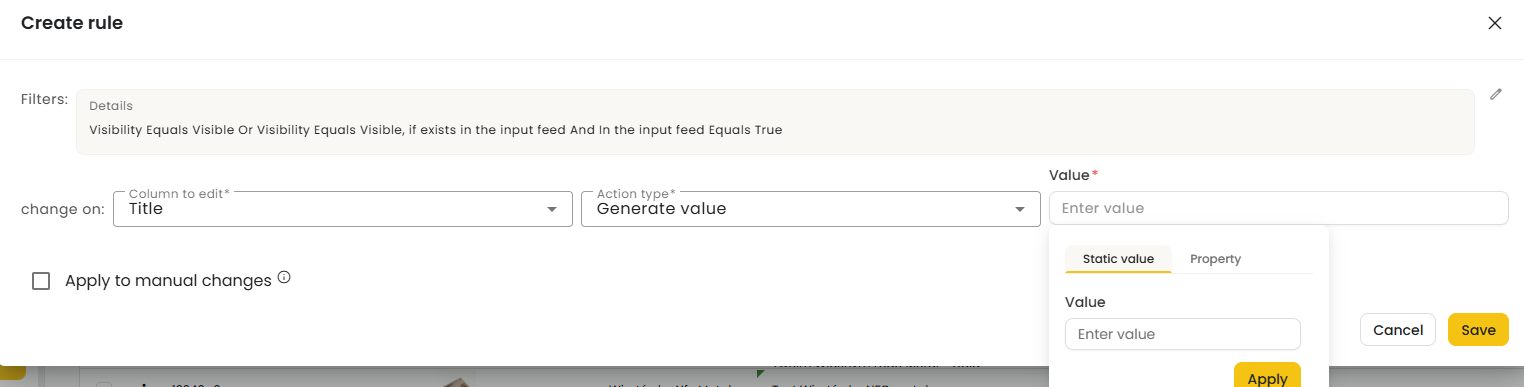
- Generate value — allows you to create a completely new title. In the value field, enter values manually, and in the property field, set the given attribute.
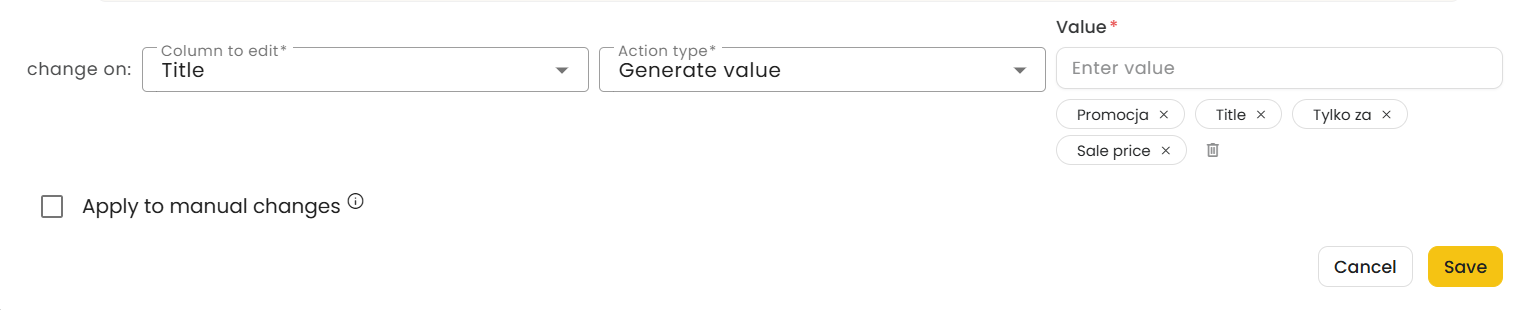
- Override — overwrites selected titles with a specific value.
- add end — adds a specific value to the end of the existing title.
- add start — adds a specific value to the beginning of the existing title.
- Default case — sets the first letter as uppercase, leaving the rest lowercase.
- Capitalized Case — changes the first letter of each word to uppercase.
- lower case — all letters lowercase.
- UPPER CASE — all letters uppercase.
- replace — find and replace.
- set empty — sets the title as empty.
How to Set short_title?
To do this, click the "Columns" icon, then search for the short_title attribute. With the column visible, you can set a rule — select Actions - Create Rule and choose the short_title column. The same panel as for changing the title will appear. We recommend using the Generate value option with dynamic attributes (property).
